

Cash
Shift Closing and Z Report
In PratikKasa, each person opens their own shift with the opening cash. When the shift closes, the cash in the drawer is counted. The app calculates the cash that should be in the drawer and shows the difference. The shift's Z report is prepared at closing.
- Windows
- Android · Z summary on screen
- iPhone and iPad · Z summary on screen
At a Glance
In Short
Opening
Enter the opening cash with «Open Shift». Several people can have open shifts at the same time.
Counting
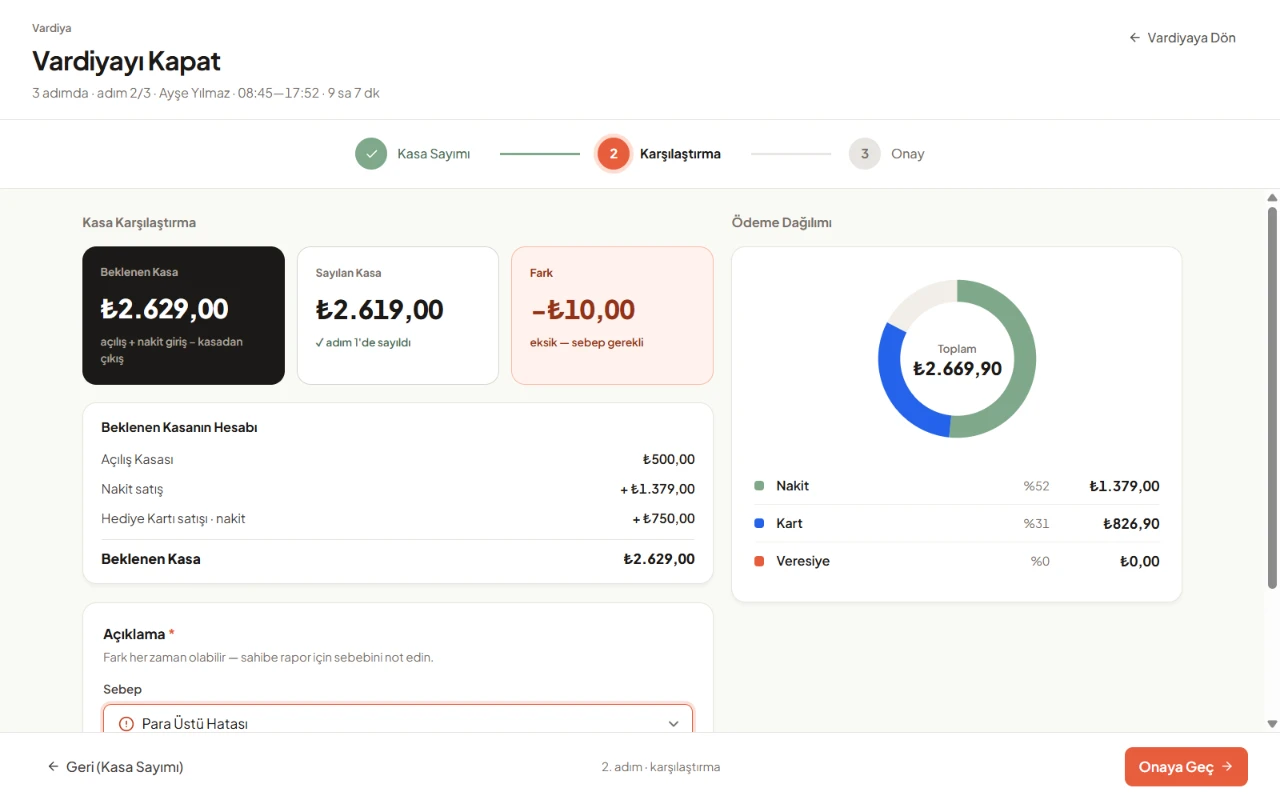
On Windows, cash is counted note by note and coin by coin. On the phone, you enter the total in the drawer.
Difference
Expected and counted cash appear side by side. On Windows, you choose the reason for any difference.
Z Report
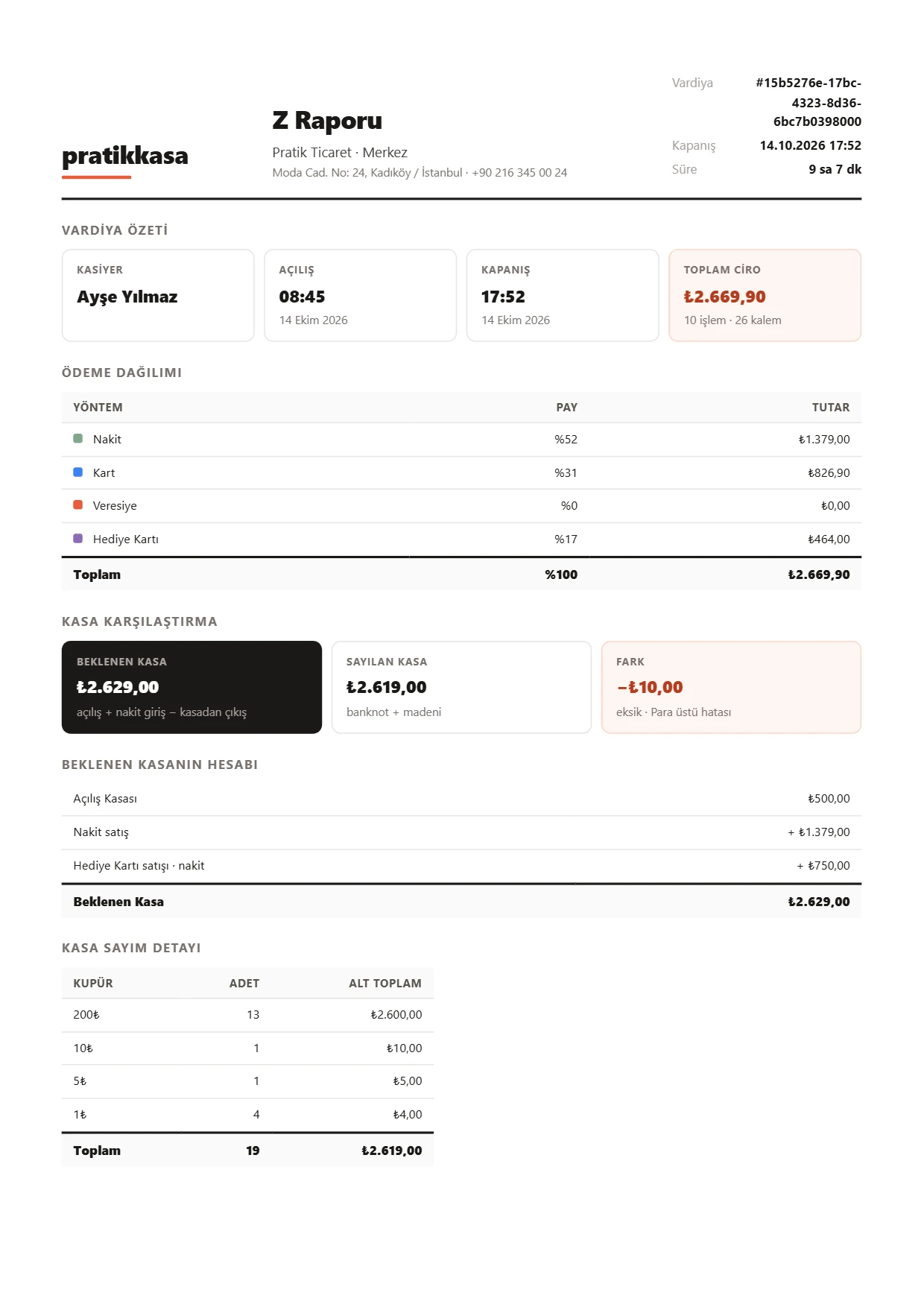
On Windows it is prepared as a PDF at closing. On the phone, the Z summary appears on screen at closing.
Step by Step
How to Close a Shift
- 1
Open the Shift
At the start of the day, tap «Open Shift» and enter the opening cash in the drawer.
- 2
Sell All Day
Sales and payment collections are recorded to your shift. If you sell without opening a shift, the shift opens by itself with zero opening cash.
- 3
Count the Cash
At closing, count the cash in the drawer. On Windows, you enter notes and coins one by one.
- 4
Check the Difference
Expected cash, counted cash and the difference appear side by side. If there is a difference, choose the reason: change error, on-account sale not entered or other.
- 5
Close
Confirm and close the shift; the Z report is prepared. A closed shift cannot be reopened.
What You Can Do
What the Z Report Shows
Shift Summary
Cashier, opening and closing time, sales total, number of transactions and items.
Payment Breakdown
Amounts for cash, card and other payment types.
Cash Comparison
Expected and counted cash, the difference and its reason.
Count and Signatures
The note-by-note count and signature lines for the cashier and the person in charge.
Good to Know
- This Z report is PratikKasa's shift report; it does not replace the fiscal Z report of a cash register (ÖKC).
- The Z report PDF is prepared in the Windows app and printed from your PDF viewer. On the phone, the Z summary appears on screen.
- There is no mid-shift report (X report).
FAQ
Frequently Asked Questions
Does PratikKasa's Z report replace a cash register's Z report?
No. PratikKasa's Z report is a cash and sales summary of the shift, not a fiscal document. You get the fiscal Z report from your cash register.
What happens if there is a cash difference?
The difference is recorded to the shift. On Windows, you choose the reason and can add a note. The difference also appears in the Z report.
Can a shift be closed without internet?
Yes. You open and close your own shift without internet.
Can several cashiers work at the same time?
Yes. Shifts belong to people; each person opens and closes their own shift. A person can have only one open shift at a time.
Where do I find the Z reports of past shifts?
In the Windows app, under Reports › Shifts.
Related
Keep Reading
Cash Register (ÖKC) Difference
PratikKasa prints an information receipt; fiscal receipts come from a cash register (ÖKC).
Corporate and Traditional Use
Use PratikKasa in two ways: managers supervise while cashiers sell, or the manager also works the register.
Gift Card
Sell gift cards at the register, take payment with them and check balances.
Try It Free for 15 Days
Shifts and cash counts are included in every plan. No card required.