

Receipts and Cash Registers
PratikKasa and a Fiscal Cash Register (ÖKC): The Difference
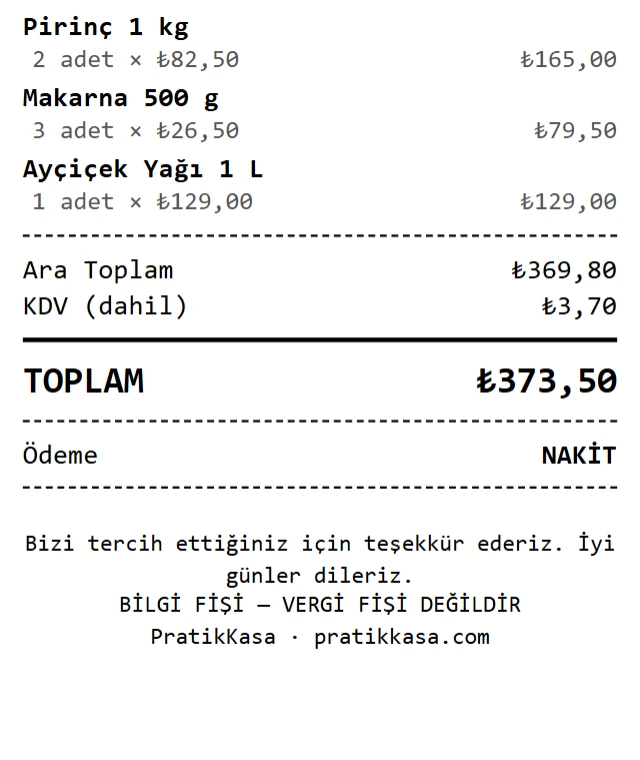
PratikKasa is a sales and business management app. In Turkey, its receipt is an information receipt and does not replace a tax receipt. A fiscal cash register (ÖKC, «yazar kasa» in Turkish) is the device that prints fiscal receipts. The two work together: PratikKasa connects to Token cash registers. For card payments, the basket goes to the cash register and the fiscal receipt comes from it; sales, stock and reports stay in PratikKasa.
- Windows
- Android
- iPhone and iPad
At a Glance
Which One Does What?
PratikKasa
Sales, stock, customers and store credit, shifts, reports and branches. Prints an information receipt.
Fiscal Cash Register (ÖKC)
The device that prints the fiscal (tax) receipt.
At the Bottom of the Receipt
By default, a PratikKasa receipt ends with a line saying it is an information receipt, not a tax receipt.
Card Payments
With a Token cash register connected, the basket goes to the device and the card is read there. Otherwise you charge the card on your own card terminal.
Step by Step
How to Use Both Together
- 1
Connect the Cash Register
In Settings › Payment Device, enter your Token cash register's terminal number; on the phone you can also scan its QR code. You set this up once.
- 2
Make the Sale in PratikKasa
Scan the products. Stock goes down and the sale goes into your reports.
- 3
Card Payments Go to the Cash Register
Choose «Card» as the payment type. The basket goes to the cash register, the card is read on the device and the fiscal receipt comes from the cash register.
- 4
Issue Cash Sales on the Cash Register
For cash sales, issue the fiscal receipt from your cash register separately.
What You Can Do
What PratikKasa Adds When You Have a Cash Register
Stock Tracking
Every sale comes off your stock. You see low-stock products in the list.
Customers and Store Credit
Track what each customer owes and pays.
Shifts and Cash Counts
Count the cash when a shift closes and see the difference.
Reports and Branches
See sales, profit and staff reports branch by branch.
Good to Know
- PratikKasa connects to Token cash registers. With other brands, you issue the fiscal receipt from the cash register separately.
- Card sales go to the cash register. For cash sales, issue the fiscal receipt from the cash register separately.
- A PratikKasa receipt is not a fiscal document. Ask your accountant about your fiscal obligations.
FAQ
Frequently Asked Questions
Does PratikKasa replace a fiscal cash register?
No. In Turkey, the receipt PratikKasa prints is an information receipt, not a tax receipt. Fiscal receipts require a fiscal cash register (ÖKC).
What is an information receipt?
A receipt that shows the products, the amount and the payment type of a sale, without fiscal value. It is a summary of the sale for your customer.
Why would I need PratikKasa if I already have a cash register?
The cash register prints the fiscal receipt. Stock, customer balances, shifts, staff and branch reports live in PratikKasa.
Does PratikKasa connect to my cash register?
Yes. PratikKasa connects to Token cash registers (ÖKC). You set up the connection once in Settings › Payment Device; for card payments, the basket goes to the cash register and the fiscal receipt comes from it.
Does PratikKasa take card payments?
Your cash register or card terminal reads the card. With a Token cash register connected, the amount goes to the device automatically; PratikKasa records the payment as card and shows it in your reports.
Try It Free for 15 Days
Try PratikKasa alongside your cash register. No card required.